Joysticks
Supported joysticks
This mainboard supports carbon-film potentiometer joysticks and various TMR joysticks. The default polarity supports PS4 TMR. Other models can be accommodated by changing the resistor configuration.
Polarity configuration locations
The red and blue boxes below identify the configuration areas for the left and right joysticks.
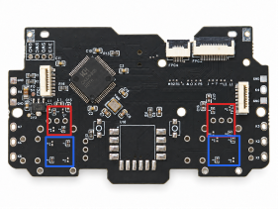
Joystick polarity configuration areas. The red and blue boxes identify which areas to modify.
Each marked area contains four resistor positions. There are two mutually exclusive configurations; choose only one:
Connect only the positions with a silkscreen outline.
Connect only the positions without a silkscreen outline.
“Outlined” and “unoutlined” refer to the mainboard’s silkscreen outlines around resistor pads, not the red and blue annotation boxes in the photo.
Configuration by model
The table assumes the factory default configuration. When a color-marked area needs changing, apply the change to the matching areas for both joysticks. Leave the other areas at their defaults.
Joystick model |
Red-box areas |
Blue-box areas |
|---|---|---|
PS4 TMR and all carbon-film joysticks |
No changes needed |
No changes needed |
PS5 TMR |
Connect only unoutlined positions |
No changes needed |
XBOX TMR |
Connect only unoutlined positions |
Connect only unoutlined positions |
Zhidong (致动) TMR |
No changes needed |
Connect only unoutlined positions |
Changing the solder configuration
These polarity configuration resistors are all 0R (0Ω) resistors, used as links. You may use 0Ω resistors or a small solder bridge between the two pads of each individual resistor position. Do not connect neighboring resistor positions together.
TMR joystick polarity varies by model. If your model requires the unoutlined configuration:
Disconnect power and identify the red or blue areas to change using the table above.
Remove the existing resistors in those areas first.
At each unoutlined resistor position in those areas, bridge its two pads with solder.
Verify that only the unoutlined positions are connected and that the outlined positions are open.
Warning
Never connect both the outlined and unoutlined positions in the same area.
Incorrect soldering positions, or a mismatch between the joystick and resistor configuration, may cause a short circuit, failure to power on, or hardware damage.
Before powering on, use a multimeter to check for a short between 3V3 and GND. If a short is present, do not power on; check the soldering and configuration first.
Example: Converting the PS4 default to PS5 TMR
The photo below shows a conversion from the default PS4 polarity to PS5 TMR. The red box highlights one group of configuration positions:
Remove the 0Ω resistors originally fitted to the outlined positions in the red-box areas.
Bridge the two pads at each unoutlined position with solder in place of a 0Ω resistor.
Leave the blue-box areas at their default configuration.
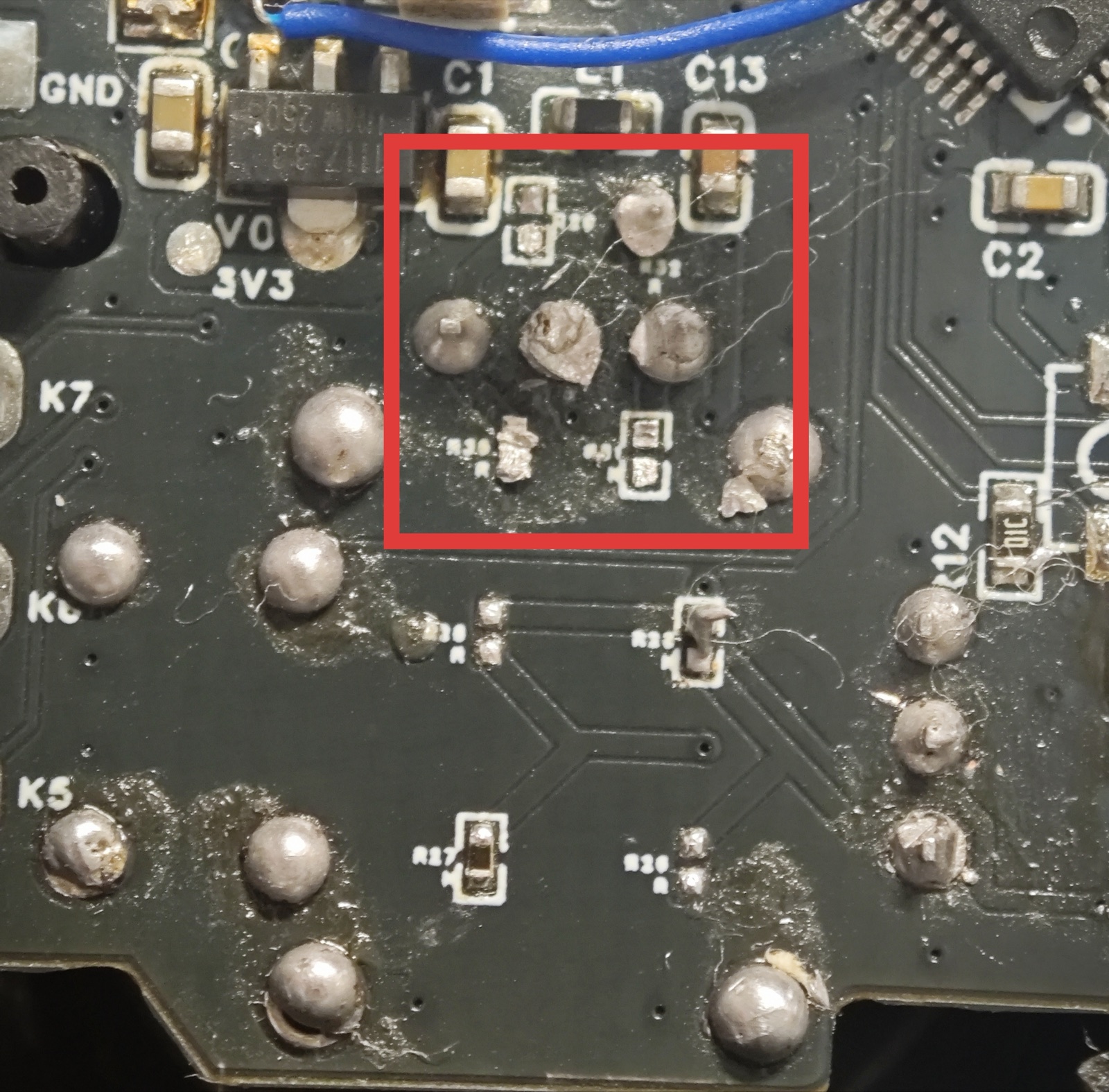
PS4-to-PS5-TMR example. Only unoutlined positions in the red-box areas are connected; solder bridges replace the 0Ω resistors.
Check again that the outlined positions are open, and check for a short between 3V3 and GND before powering on.